How we design and produce accessible, PDF/UA-compliant reports


As an Ontario-based graphic design agency, we understand the importance of accessibility and have extensive experience designing documents that support the requirements of the Accessibility for Ontarians with Disabilities Act (AODA), the Web Content Accessibility Guidelines (WCAG), and the PDF/UA standard for accessible PDFs.
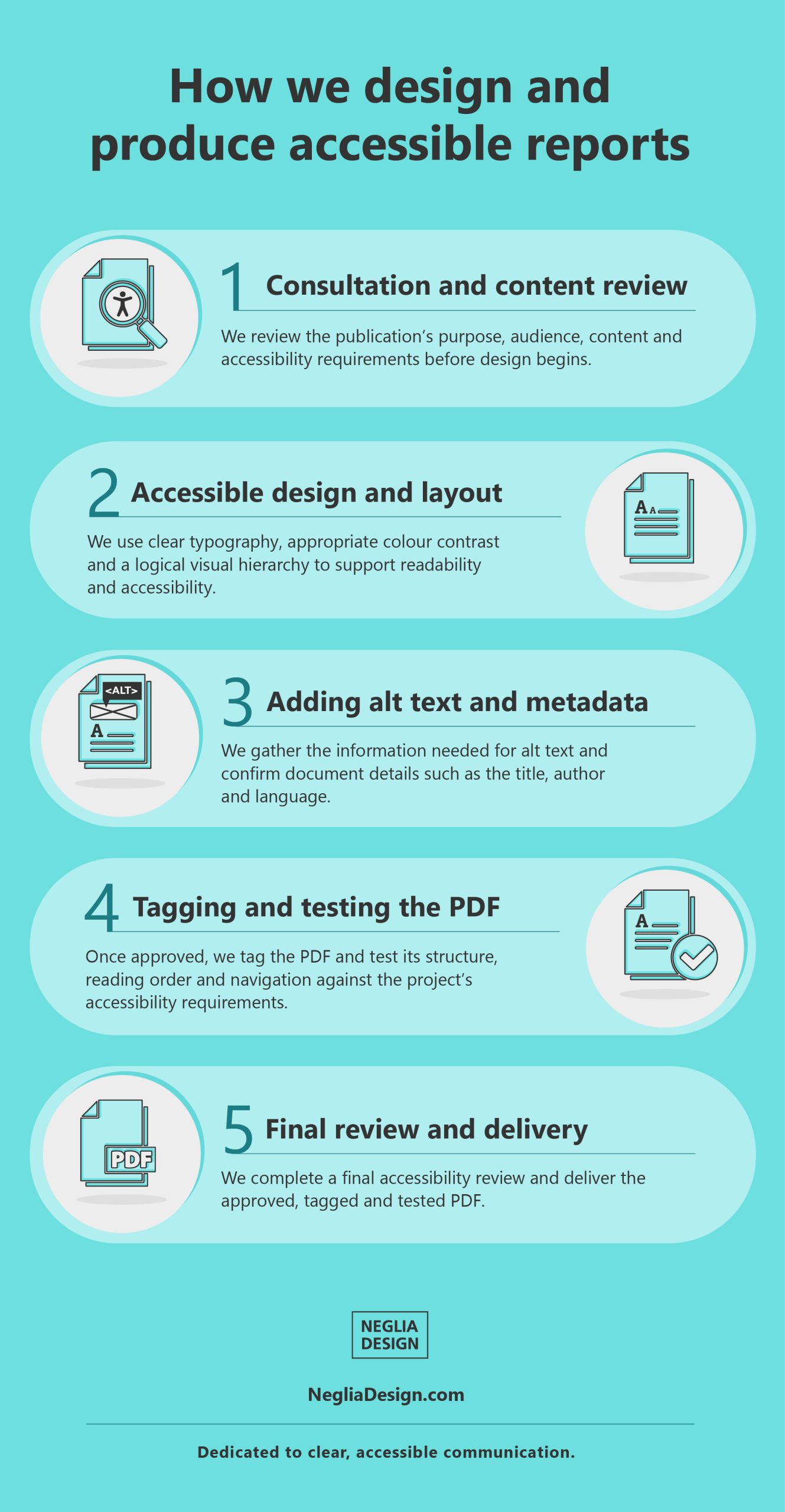
Accessibility is considered throughout the design process. Once the content and layout are finalized and approved, the PDF is tagged and tested against the accessibility requirements established for the project. This article outlines the key steps we follow to design and produce accessible publications, from the planning stage through to final delivery.
Why does accessibility matter?
Accessible design ensures your content can be used by a wide range of readers, including people with disabilities. Some rely on screen readers or braille displays, while others may have low vision, colour blindness, cognitive or motor challenges, or a temporary condition such as recovering from eye surgery.
Clear, well-structured content helps all readers.
We take care to address the accessibility requirements established for the project while supporting our client’s communication goals, ensuring documents are not only accessible but also clear and engaging.

Step 1: Consultation and content review
Every accessible publication starts with understanding your goals. We begin with a consultation to learn the purpose of your publication, your audience’s needs, document distribution, and the accessibility requirements.
During this stage, we review the content and identify anything that may affect the design, navigation, or accessibility of the final publication. This may include inconsistent heading levels, improperly structured lists, complex tables, or missing information for images and charts.
For a broader discussion of structure, hierarchy, readability, and publication systems, read our article, Long documents require more than good design.

Step 2: Accessible design and layout
Once the content is ready, our design team gets to work. At this stage, we focus on creating a visually appealing and inclusive layout, with accessibility considered throughout the design process.
We design with a range of users in mind, including those with visual, cognitive, or motor disabilities. This means using clear type, appropriate colour contrast, readable font choices, and a logical visual hierarchy. We organize content into sections with meaningful headings, avoid overly dense text where possible, and apply a consistent grid.
We also consider how lists, tables, charts, images, links, and recurring elements will function in the final accessible PDF. Interactive elements, where included, are designed to be keyboard-friendly and not require fine motor control.
These strategies improve readability and help the publication work well whether it is accessed visually or with assistive technology.

Step 3: Adding alt text and metadata
Images and graphics need to be accessible too. That is where alternative text, or alt text, comes in. Alt text provides descriptions of meaningful visual elements, allowing screen readers to communicate their purpose to users who cannot see them.
Simple images may require a brief description, while complex charts, diagrams, or infographics may need more detailed supporting information. Because clients and subject-matter experts often have the strongest understanding of what a visual is intended to communicate, we provide a simple form containing the images and graphics so the necessary information can be supplied and reviewed.
Metadata, such as the document title, author, subject, and language, also helps make the publication accessible, searchable, and easier to identify.

Step 4: Tagging and testing the PDF
After the content and layout are finalized and approved, we convert the file to a PDF and begin tagging the document.
Tagging adds a behind-the-scenes structure that identifies headings, paragraphs, lists, tables, links, images, and reading order so screen readers and navigation tools can interpret the content correctly.
We then test the PDF against the accessibility requirements established for the project. These may include PDF/UA conformance and applicable WCAG requirements.
Testing includes automated accessibility checks as well as manual review of the document structure, reading order, navigation, links, tables, lists, and alternative text. Where required, we can also test using screen readers or keyboard-only navigation. Any issues identified during testing are corrected before final delivery.

Step 5: Final review and delivery
We conduct one final review before delivering the completed file to confirm that it functions as intended and that the agreed accessibility requirements have been addressed.
Once everything is in place, we send the approved, tagged, and tested PDF along with an accessibility test report, which is included in the project.
Our goal is to provide a professionally designed accessible publication that clients can confidently share with their audience.
About our agency’s experience
At Neglia Design, we believe accessibility is about more than compliance. It is about clear communication, inclusive thinking, and designing with care.
For more than a decade, we have helped government agencies, public-sector organizations, corporations, associations, and not-for-profit organizations create accessible reports and publications without compromising clarity or design quality.
Our experienced team of designers and accessibility specialists brings knowledge of accessible document requirements together with the creative and production expertise needed to present complex content clearly.
We take pride in making the process straightforward for our clients—from consultation and design through accessible PDF preparation, testing, and final delivery.
Learn more about our Long-form report design and accessible PDF design services, or contact us if you are looking for a trusted partner to design and produce an accessible publication.
Want to discuss a future project? Please contact us for a complimentary appointment.
 Neglia Design at 40: Celebrating Creative Thinking and Design
  Long documents require more than good design
  Designing with intention: the story behind our logo
  How we design and produce accessible, PDF/UA-compliant reports